GrapheneOS vs LineageOS: Security, Apps and Device Support
Compare GrapheneOS and LineageOS by supported hardware, update coverage, Google services and essential apps, with a checklist before you change phones.
DownloadAPK Editorial Team May 16, 2026 · Updated September 11, 2026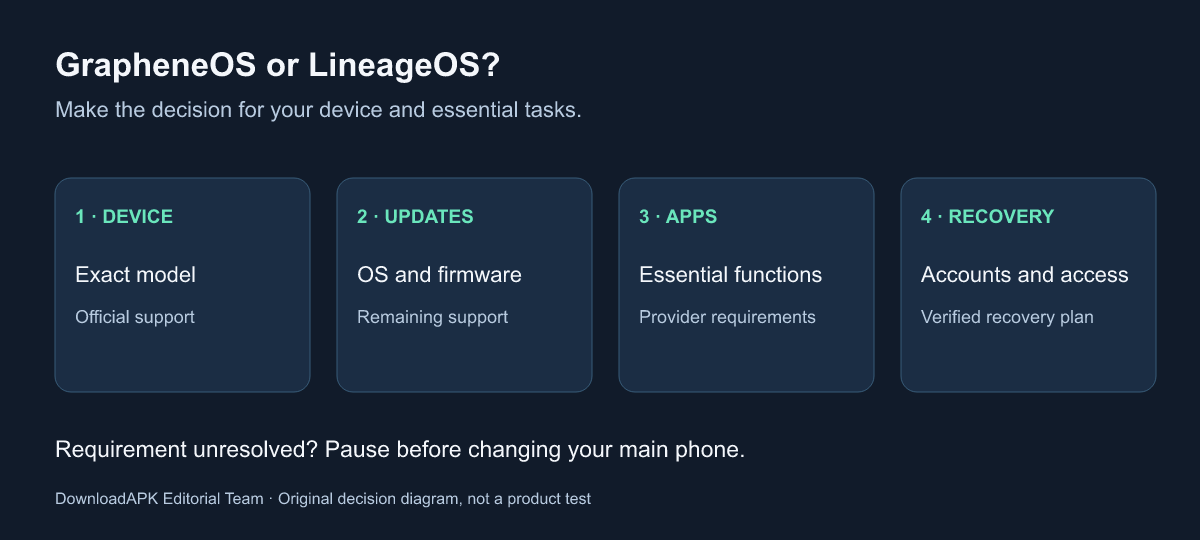
Choose between GrapheneOS and LineageOS by checking the exact phone, its remaining support and the apps you cannot lose. GrapheneOS is particularly relevant when you want its additional security hardening and can use officially supported hardware. LineageOS is worth evaluating when your existing device has a maintained official build. Neither name, on its own, proves that the resulting phone will meet your needs.
This comparison is for someone deciding whether to change an Android operating system, not for someone looking for a pirated app or a shortcut around an app provider’s security rules. It does not require rooting, and it does not provide a generic flashing recipe. Installation instructions belong to the official project page for the precise device.
The DownloadAPK Editorial Team reviewed the documentation cited here on 11 September 2026. We have not tested every supported device, audited either codebase or measured a banking-app success rate. Where a conclusion depends on your model, your account or a provider’s policy, the guide makes that dependency explicit.
Contents
- The comparison at a glance
- Start with your exact device
- Security updates are more than an Android version
- What security hardening does and does not mean
- Bootloader rules are not interchangeable
- Google services and app compatibility
- Banking, payments and Play Integrity
- Build an essential-app checklist
- Plan for accounts and recovery
- Three example decisions
- Make your decision without a universal winner
- Frequently asked questions
GrapheneOS and LineageOS at a glance
Both projects build on Android’s open-source foundations, but they make different choices about hardware scope and additional features. The useful question is which combination you can actually run and maintain. Comparing two project names without naming the devices can hide the most important difference.
| Decision point | GrapheneOS | LineageOS |
|---|---|---|
| Hardware starting point | Check the project’s current supported-device list | Check the exact model and variant in the official device directory |
| Main reason to investigate | Additional privacy and security hardening on supported hardware | A maintained alternative Android system for a wider set of devices |
| Google services | Optional sandboxed Google Play within the project’s documented model | Google apps and other additions require checking the applicable official instructions |
| Security maintenance | Evaluate the device’s full support period and project releases | Distinguish Android platform updates from vendor and firmware coverage |
| App-dependent restrictions | Check each provider’s requirements and your actual tasks | Check each provider’s requirements and your actual tasks |
| Installation decision | Follow the GrapheneOS installer and verification instructions | Follow the instructions for that exact LineageOS device |
The table is an editorial comparison of documented approaches, not a numerical security ranking. A person who already owns a supported device faces a different decision from someone buying a replacement. Likewise, a spare phone used for learning has a different role from the only device that can approve a bank transfer.
Our Android security topic provides the broader reading context. Here, keep the question narrow: which operating-system option is appropriate for the device and essential tasks in front of you? You can make progress on that question without changing anything on the phone today.
Start with your exact device, not the brand name
The GrapheneOS supported-device FAQ identifies current production support. Check it directly before buying or installing. The list changes, and an old comparison’s range of Pixel generations is not a reliable substitute. Model, variant and the ability to meet the installation requirements all matter.
For LineageOS, use the official device directory. Its project-maintained FAQ source is explicit that an unlisted model is not supported merely because it resembles a listed one. A similar commercial name does not prove that an image is compatible.
Write down the model identifier from the device settings and match it with the official documentation. If you are buying second-hand, ask for enough information to verify the exact variant before paying. A seller’s statement that a phone “supports custom ROMs” is too broad to settle whether it can run your chosen system in the supported way.
Also distinguish historical support from a currently maintained release. A forum thread showing a successful installation years ago is useful history, not evidence of today’s update coverage. An unofficial build can be a separate community project, but it should not be silently presented as an official release with the same maintenance expectations.
If neither project supports your exact device, stop the comparison there. You can investigate supported hardware or continue evaluating the manufacturer’s supported operating system. Guessing a nearby model’s image is not a reasonable way to close a documentation gap.
Security updates are more than an Android version
An Android version number is one part of a phone’s software state. It does not tell you whether every driver, vendor component or firmware image has received all relevant fixes. A phone can display a newer Android interface while still depending on older device-specific components.
The LineageOS FAQ distinguishes Android platform patches, vendor security patch levels and hardware-specific firmware. It explains that the project cannot independently update every proprietary firmware component. The GrapheneOS FAQ likewise links complete device support to maintenance of the underlying device software. Neither description supports the claim that installing a different OS automatically resets a phone’s entire security-support lifetime.
For your shortlist, record three separate items: whether the project currently supports the model, where its release information is published and what the device documentation says about required firmware. If the answer to one is unclear, keep it marked as unknown. A recent release date cannot answer all three questions at once.
Think about the period you intend to keep the device. A low purchase price can be less attractive if you will soon need another migration. That is a planning judgment, not a promise that any specific model will be supported for the exact number of years you want.
Updates also involve you. Consider whether you are willing to read upgrade instructions, maintain recoverable account access and investigate a failed update without rushing into unrelated fixes. You do not need to be a developer to consider these responsibilities, but they should be part of the choice rather than a surprise after installation.
What security hardening does and does not mean
GrapheneOS documents additional exploit mitigations, changes to sandboxing and controls such as Network permission, Storage Scopes and Contact Scopes. The features overview distinguishes these additions from protections already present in modern Android. This is a better source for feature availability than a comparison chart that labels everything “exclusive”.
Hardening means changing the system to reduce opportunities for exploitation or limit the consequences of a compromise. It does not establish that the device is immune to spyware, that every app is trustworthy or that a user cannot disclose information voluntarily. We have not performed an independent penetration test that would justify such claims.
LineageOS should not be described as simply having “no security” because its priorities differ. Equally, a preference for its interface or device support is not evidence that it provides the same additional mitigations as GrapheneOS. Compare specific properties instead of attaching an absolute safety label to either project.
Your account choices remain relevant. If you sign into a service and submit information to it, changing the phone OS does not erase the service’s knowledge of that interaction. Privacy settings, app permissions and the data you choose to share are related decisions, but they are not interchangeable with operating-system exploit resistance.
For someone facing a targeted threat, a magazine comparison is not an operational-security assessment. The appropriate support may involve an employer or a qualified security team that can consider accounts, communications, physical access and recovery together. This article does not recommend a system merely because the reader is a journalist or activist, and it does not promise protection at a border or during an incident.
Bootloader rules are not interchangeable
A bootloader is involved in starting the operating system. Android’s Verified Boot documentation describes the chain of trust used to verify software before it runs. The state of that process is distinct from whether an app happens to open successfully.
GrapheneOS provides an official installation process that includes locking the bootloader and verifying the installation on supported devices. That sequence applies to its supported hardware and official images. Treat it as a complete procedure, including its warnings and prerequisites, rather than selecting a few commands from it.
Do not transfer the same step to an arbitrary LineageOS installation. The LineageOS FAQ warns that relocking can leave devices unusable and is not generally supported. The correct conclusion is to follow the applicable device instructions, not to improvise a relocking command because it sounds more secure.
For the same reason, keep a decision guide separate from an installation guide. The question “which OS fits my needs?” can be answered with documentation and an app checklist. The question “what should this particular device flash, in what order?” requires a different level of device-specific verification.
Unlocking and installation can erase data. Before reaching that stage, resolve account access and recovery as well as file backup. We intentionally do not provide a universal command sequence here: a command that is correct for one supported installation can be wrong for another. If the official prerequisites cannot be met, pausing is part of following the procedure.
Google services and app compatibility
GrapheneOS offers sandboxed Google Play: its compatibility layer allows Google Play components to operate as ordinary sandboxed apps without the usual privileged OS integration. The components are optional and are installed within the user profile where they are needed.
That arrangement should not be described as removing every connection to Google while simultaneously keeping all Google-dependent functions. If you choose to use a Google service, that choice still has its own account, network and data implications. Sandboxing changes privileges and boundaries; it does not make the service cease to be a service.
For LineageOS, check the official guidance for your chosen build before deciding which additional services you need. Do not assume that every package described online is included in the official project. The name “LineageOS” is sometimes used loosely for modified distributions, so record exactly what you intend to install and who maintains each addition.
microG, a reimplementation of some Google-service interfaces, is a different approach from installing Google’s own components. Its presence should not be treated as proof of complete app compatibility, and it is not the same feature as GrapheneOS’s sandboxed Play. This comparison does not rank untested configurations or direct you to unofficial packages.
Keep the requirement at the task level. “I need this app’s notifications” is more useful than “I need everything from Google”. Ask which functions matter, what the relevant project documents and whether the provider supports that use. You may decide that a particular service is necessary, optional or not needed, but make that decision explicitly.
Banking, payments and Play Integrity
Installing Google Play components does not guarantee that a bank will accept the operating system. Google describes Play Integrity as a set of signals that app developers can use in deciding how their apps and services respond. The app provider’s policy matters alongside technical compatibility.
GrapheneOS’s attestation compatibility guide explains how developers can support appropriately signed alternate systems through Android hardware attestation. This is documentation for implementing support. It is not evidence that every bank has implemented it or that installing sandboxed Play forces a provider to accept the phone.
An older version of this article incorrectly implied broad Play Integrity success and described SafetyNet results as a current comparison. Google states that the SafetyNet Attestation API was fully shut down in January 2025. We have removed those assurances. Older project pages and forum posts can still use SafetyNet terminology; distinguish that historical wording from current app requirements.
Test more than the login screen. A bank app may open while account activation, transfer approval or another essential function follows different checks. Contactless payments are a separate requirement again. Do not assume that successful banking login proves that your wallet, card provisioning or tap-to-pay workflow will work.
If an essential provider does not support the configuration, record that as a decision constraint. This guide does not recommend integrity-spoofing modules, borrowed attestation keys or root-based workarounds. Staying with a supported configuration, asking the provider about support or keeping a legitimate alternative access method can be more useful than repeatedly chasing a fragile workaround.
Build an essential-app checklist before migrating
A short list of functions you cannot lose is more valuable than a count of how many apps supposedly work. Start with the apps that let you access money, work, communication, travel and important records. Then distinguish installation, sign-in and the specific task that makes each app necessary.
The following worksheet is an original planning tool, not a report of tests we performed. Fill it with your own device, app version and observed result. If you have only read a community comment, put “reported, not tested” rather than a check mark.
| Requirement | Example task to verify | What to record |
|---|---|---|
| Banking | Sign in and use the approval method you need | App version, provider guidance and actual result |
| Work | Access the approved workplace service | Employer policy and authorised configuration |
| Authentication | Use and recover your second factor | Recovery method retained outside the phone |
| Messaging | Receive the notifications you rely on | Profile, service configuration and observed delivery |
| Travel | Retrieve a ticket or booking | Offline access where the provider supports it |
| Payments | Use the intended payment method | Wallet/card support checked separately from bank login |
For workplace apps, ask the responsible administrator before changing an organisation-managed device. A personal preference for a system does not override management requirements. The comparison is not a reason to evade a work profile, device policy or ownership restriction.
For authentication, our authenticator-app overview can help identify the category of tools involved, but follow your chosen provider’s current export and recovery instructions. The important acceptance criterion is continued authorised access, not simply seeing an app icon on the new home screen.
Plan for accounts and recovery, not just files
A folder of copied photos is not the same as a recoverable phone setup. Account sign-in, second factors, app-specific records and a workplace enrolment can each have separate recovery requirements. Identify them while the existing phone still works, rather than discovering them after a reset.
Keep a list of accounts that depend on the device and note where their official recovery instructions are located. Do not put passwords or recovery codes into a public checklist or a support forum. A status such as “recovery method verified” is enough for a planning document shared with someone helping you.
The power-user topic collects related reading, but a general article does not replace device-specific restoration instructions. Treat compatibility with the exact OS, app and restore method as something to verify. The fact that a backup file exists does not demonstrate that it will restore every app’s state on a different operating system.
Set a clear point at which you will stop if an essential requirement fails. That might be an unsupported device variant, an unavailable recovery method or a work app your employer cannot support. A stop condition prevents enthusiasm for the new system from turning into a rushed decision about your only working phone.
If you plan a return to the manufacturer’s OS, read the official restoration requirements in advance. Do not assume a return is instant or preserves data. This article is a comparison of choices; it is not a promise that every transition between systems is reversible without loss.
Three example decisions using the same criteria
You already own a currently supported Pixel
In this illustrative scenario, the owner wants GrapheneOS’s additional hardening and has checked the exact device against the official list. The next task is to examine essential app requirements and recovery, not to search for a global winner in a feature chart. If those checks are satisfactory, the official installation guide becomes the relevant next document.
If a critical payment or workplace requirement is unresolved, the device match alone does not finish the decision. The owner can postpone migration while confirming that requirement. The scenario does not claim that a particular bank or employer will approve the configuration.
You want to keep an older, officially supported LineageOS device
Here, the starting point is an existing phone with a current device-specific LineageOS page. A maintained alternative may be useful, but the owner checks firmware limitations separately instead of treating a newer Android version as a complete security renewal. The intended role of the phone matters: a secondary learning device and a primary authentication device deserve different acceptance criteria.
This scenario does not imply that every old phone should be kept indefinitely. Battery condition, hardware reliability and remaining maintenance can change the decision. The comparison should help expose those trade-offs without inventing a support guarantee.
You depend on an app whose provider requires another configuration
In the third example, an essential service rejects the planned system or the provider cannot confirm support. The owner records the restriction and evaluates authorised alternatives. The answer may be to keep the present supported configuration, rather than trying to change what the app reports about the device.
That conclusion does not prove the rejected OS is insecure. It means the proposed setup does not currently meet this person’s complete requirements. A technically interesting platform can still be the wrong choice for a particular primary phone.
Make the decision without a universal winner
Use four questions in order: is the exact device officially supported; what maintenance remains; can essential tasks be performed in the supported configuration; and is account recovery ready? Those questions turn a general comparison into a decision that can be checked.
GrapheneOS is a strong candidate to investigate when its documented hardening is your priority and supported hardware is available. LineageOS can be a relevant option for an existing device with current official support. Keeping the manufacturer’s supported OS is also a valid outcome when either alternative fails an essential requirement.
The cost of switching includes attention and recovery planning as well as any hardware purchase. We have not calculated a universal savings figure or a performance advantage. A decision that avoids an unsupported installation or a loss of access is useful even if it results in no immediate change.
If your next question is about getting an individual app rather than changing the operating system, read our download-link verification guide. It addresses a different decision. Installing a custom OS does not make every download trustworthy or remove the need to verify a publisher.
Keep the completed checklist and the official device page together. Revisit them when the device’s support status or a critical app requirement changes. The conclusion is tied to a particular setup and date, not a permanent badge attached to a project name.
FAQ
- Is GrapheneOS better than LineageOS?
- GrapheneOS is the more relevant comparison when you want its additional hardening on officially supported hardware. LineageOS may fit an existing device that has current official support. Neither answer overrides app compatibility, firmware support or your ability to maintain the phone. There is no universal winner for every device and user.
- Can I install GrapheneOS on any Android phone?
- No. Check the official supported-device list and installation requirements for the exact model and variant. Similar hardware, an old article or a seller's description does not establish current production support. Do not download a build for a different phone to try it.
- Will sandboxed Google Play make every banking app work?
- No. It can provide Google service functionality without the privileged integration used on a typical stock device, but app providers can apply their own compatibility and integrity policies. Check the exact app and test the tasks you need. Contactless payment support is a separate question from opening a banking app.
- Does LineageOS restore all security updates to an old phone?
- Not necessarily. Android platform patches and manufacturer firmware are different parts of the software stack. LineageOS cannot independently update every proprietary component. Consult the exact device's documentation and support status instead of assuming that a newer Android version makes all components current.
- Should I relock the bootloader after installing LineageOS?
- Do not copy that step from a GrapheneOS guide. The LineageOS FAQ warns that relocking can leave devices unusable and is not a generally supported operation. Follow the official instructions for your exact device. GrapheneOS has its own installation and verification process on supported hardware.
- Is SafetyNet a useful compatibility test in 2026?
- The SafetyNet Attestation API was fully shut down in January 2025 according to Google. Old screenshots or guides promising a SafetyNet pass are not a current compatibility guarantee. Use current app requirements and Play Integrity documentation, while distinguishing app policy from the operating system's security properties.
- Have you tested every app on both systems?
- No. This comparison is based on official project and Android documentation reviewed on 11 September 2026. It is not a laboratory assessment or a test of your bank, employer or device. The acceptance checklist helps you record your own results without treating anecdotal reports as guarantees.